教學3 改寫提交
7. Merge --squash
為了節省時間,我們幫您準備了已經有歷史記錄的本地端數據庫。
從這裡下載
移至stepup-tutorial/tutorial7 目錄。本地端的歷史記錄狀態會顯示如下圖。現在,我們來將 issue1 分支的所有的提交合併成一個提交並導入到 master 分支吧!
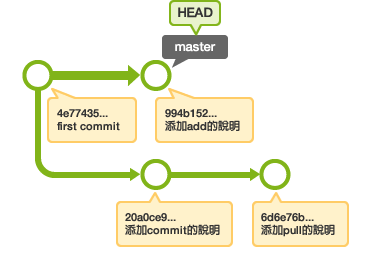
切換到 master 分支後, 執行 merge --squash 。請參考下圖:
$ git checkout master
Switched to branch 'master'
$ git merge --squash issue1
Auto-merging sample.txt
CONFLICT (content): Merge conflict in sample.txt
Squash commit -- not updating HEAD
Automatic merge failed; fix conflicts and then commit the result.
看來發生衝突了,請打開sample.txt,修改衝突的部分,然後提交。
$ git add sample.txt
$ git commit
[master 0d744a7] Conflicts:   sample.txt
 1 files changed, 4 insertions(+), 0 deletions(-)
這樣 issue1 分支上的所有提交都合併添加到 master 分支了。
請用log命令確認歷史記錄。