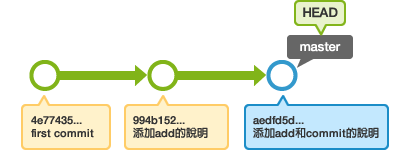
教學3 改寫提交
5. 使用 rebase -i 合併提交
為了節省時間,我們幫您準備了已經有歷史記錄的本地端數據庫。
從這裡下載
到下載檔案中的 stepup-tutorial/tutorial5
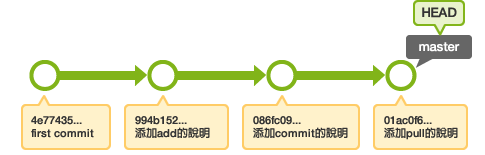
目錄。本地端的歷史記錄狀態會顯示如下圖。
我們來試試合併「添加commit的說明」和「添加pull的說明」的提交,成為一個提交吧!
若要合併過去的提交,請使用rebase -i命令。
$ git rebase -i HEAD~~
預設的文字編輯器會自動開啟,您將看到HEAD 到 HEAD~~ 的提交如下圖顯示。
pick 9a54fd4 添加commit的說明
pick 0d4a808 添加pull的說明

# Rebase 326fc9f..0d4a808 onto d286baa
#
# Commands:
#  p, pick = use commit
#  r, reword = use commit, but edit the commit message
#  e, edit = use commit, but stop for amending
#  s, squash = use commit, but meld into previous commit
#  f, fixup = like "squash", but discard this commit's log message
#  x, exec = run command (the rest of the line) using shell
#
# If you remove a line here THAT COMMIT WILL BE LOST.
# However, if you remove everything, the rebase will be aborted.
#
將第二行的 "pick" 改為 "squash",儲存後並退出。由於合併後要提交,所以編輯器會提醒您編輯這個最新的提交訊息,請編輯訊息後儲存並退出。
這樣,兩個提交就合併成一個提交了。請用 log 命令確認歷史記錄。