教學1 使用分支
5. 平行操作
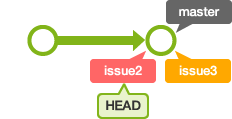
接下來,建立2個分支來嘗試平行操作吧。
首先,請建立 issue2 分支和 issue3 分支,並切換到 issue2 分支。
$ git branch issue2
$ git branch issue3
$ git checkout issue2
Switched to branch 'issue2'
$ git branch
* issue2
  issue3
  master
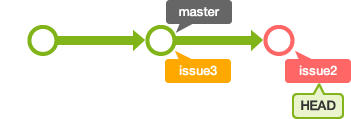
在myfile.txt 檔案增加以下粗體文字-「commit 記錄索引的狀態」然後提交。
連猴子都懂的Git命令
add 修改加入索引
commit 記錄索引的狀態
$ git add myfile.txt
$ git commit -m "添加commit的說明"
[issue2 8f7aa27] 添加commit的說明
 1 files changed, 2 insertions(+), 0 deletions(-)
接著,切換到 issue3 分支。
$ git checkout issue3
Switched to branch 'issue3'
打開 myfile.txt 檔案。因為新增的內容是在 issue2 分支中增加的,所以在 issue3 分支的 myfile.txt 裡並不會有那一行文字。
添加一行"pull 取得遠端數據庫的內容"之後提交。
連猴子都懂的Git命令
add 修改加入索引
pull 取得遠端數據庫的內容
$ git add myfile.txt
$ git commit -m "添加pull的說明"
[issue3 e5f91ac] 添加pull的說明
 1 files changed, 2 insertions(+), 0 deletions(-)
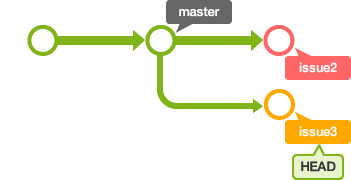
這樣,我們分別兩個在不同的分支平行增加了兩行不一樣的文字內容。