教學3 改寫提交
4. Cherry-pick
為了節省時間,我們幫您準備了已經有歷史記錄的本地端數據庫。
從這裡下載
進入下載檔案中的 stepup-tutorial/tutorial4 目錄。本地端的歷史記錄狀態會顯示如下圖。我們來將其他分支提交的「添加commit的説明」的修改導入到 master 分支。
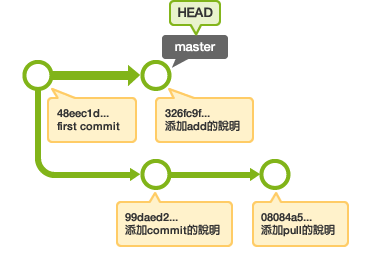
切換到 master 分支後,使用
cherry-pick命令,取出「添加commit的説明」的提交,再將其添加到
master。
(注意:此教學裡的 "99daed2"
提交和您下載數據庫裡的提交有可能會有不同。請在下載的數據庫裡執行
git log,確認正確的提交之後再使用。)
$ git checkout master
Switched to branch 'master'
$ git cherry-pick 99daed2
error: could not apply 99daed2... commit
hint: after resolving the conflicts, mark the corrected paths
hint: with 'git add <paths>' or 'git rm <paths>'
hint: and commit the result with 'git commit'
若發生衝突,請打開 sample.txt,修改衝突的部分之後再提交。
$ git add sample.txt
$ git commit